Guides / Google Search Console
Why is my site not indexed by Google?
Start with one question: is the page really missing?
For a single page, use the URL Inspection tool in Search Console: paste the address and read the verdict. Google's help says the Page indexing report is not the place to look up one page (Google: Page indexing report).
- URL is on Google: the page is indexed.
- URL is not on Google: Google: it "means that the URL can't appear in Search results". Open the Page indexing section of the result: the reason is generally under Crawl (Google: URL Inspection tool).
- URL is unknown to Google: Google "hasn't seen this URL before". Google's fix: run the live test, fix what it finds, then request indexing (Google: URL Inspection tool).
For a small site, Google says you may not need the report at all: "If your site has fewer than 500 pages, you probably don't need to use this report." Search Google for site:example.com to see a sample of the pages it knows, or for site: followed by the exact address of one page. Google says to open the report only if those searches return no results (Google: Page indexing report).
If a brand-new site shows nothing at all, Google needs to find it first: "you must either submit a sitemap or page crawl request, or else Google must find a link to your page somewhere." After that, "it can take some time (up to a few weeks) before Google crawls some or all of your site." Google's advice for a new website is to request indexing of the home page first (Google: Page indexing report).
Where to find the reason
In Search Console, open Indexing > Pages. The top of the report shows how many pages are indexed and not indexed, and the date of its last update.
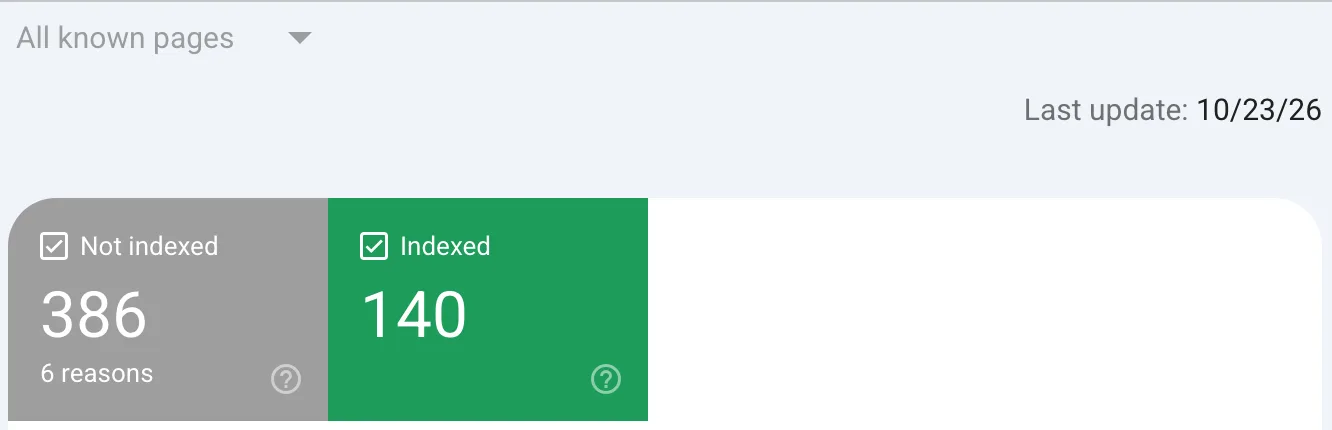
Below it, the table Why pages aren't indexed lists one row per reason, with a Source column. Google says: "In general, you can fix only issues where the source is listed as 'Website'." Click a row to see the addresses it covers. The list shows at most 1,000 examples per reason (Google: Page indexing report).
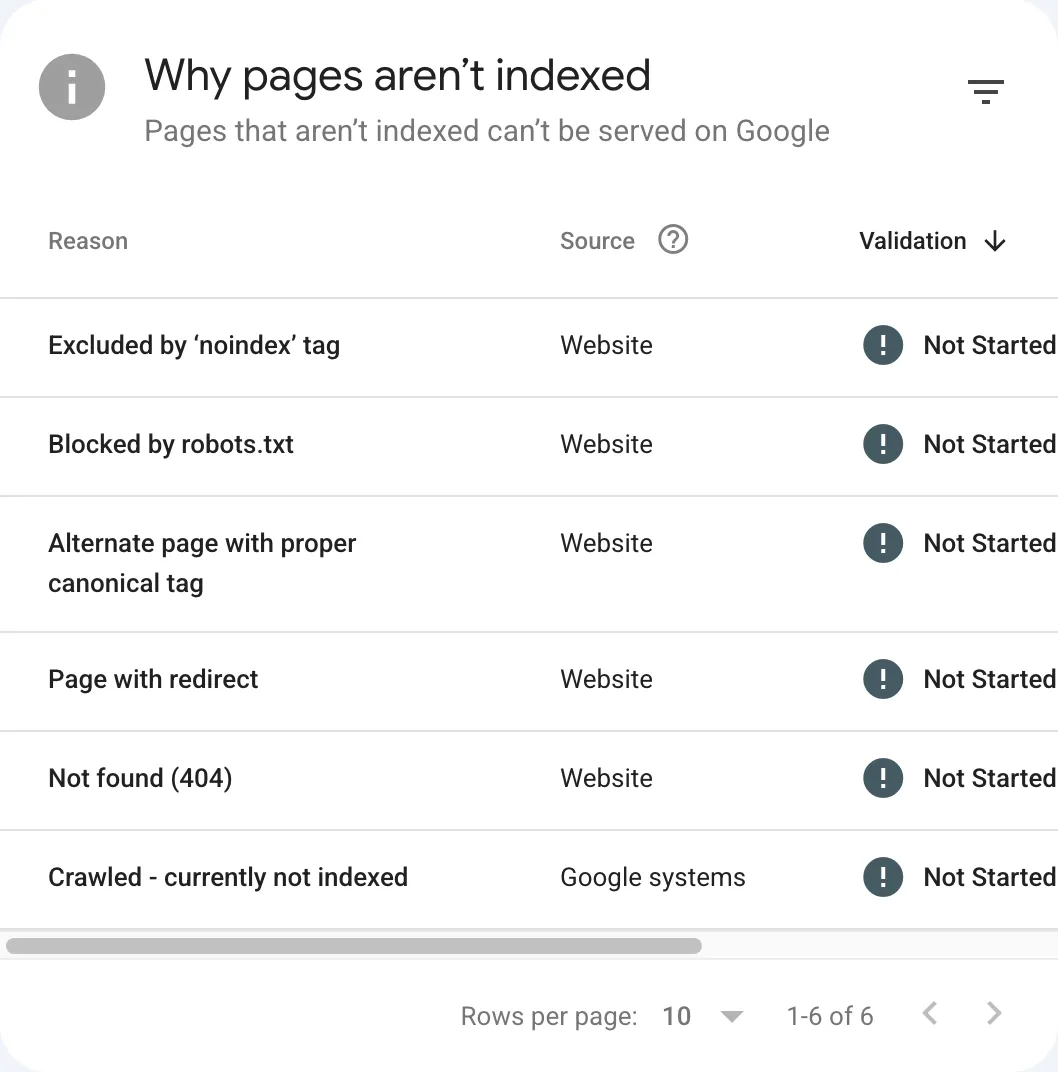
The same six rows with their page counts, from the report's last update on 23 Oct 2026. The source is Website for the first five and Google systems for the last.
| Reason | Pages |
|---|---|
| Excluded by ‘noindex’ tag | 159 |
| Blocked by robots.txt | 60 |
| Alternate page with proper canonical tag | 38 |
| Page with redirect | 10 |
| Not found (404) | 4 |
| Crawled - currently not indexed | 115 |
The report does not always use the names on Google's help page. On our own site it shows "Excluded by ‘noindex’ tag" where the help page says "URL marked 'noindex'", and "Blocked by robots.txt" where the help page says "URL blocked by robots.txt". The headings below use the report's name where we have seen it, and the help page's name otherwise.
Read the row before you act. Google's help puts it plainly: "It's fine for a URL not to be indexed for the right reasons", for example a robots.txt rule you meant, a noindex tag, a duplicate, or a 404 for a page you removed on purpose (Google: Page indexing report).
Find your status
Reasons where your site told Google to skip the page
Google's help counts a robots.txt rule you meant, a noindex tag and a duplicate among the right reasons for a page to stay out (Google: Page indexing report). Check that each address really is one you want out of Google.
Excluded by ‘noindex’ tag
The help page calls this "URL marked 'noindex'". Google found a noindex rule in the page or its HTTP header and left the page out. If you want it indexed, remove the rule, publish, then run Test live URL in URL Inspection: under Indexing allowed? the noindex should be gone. Then click Request indexing (Google: Page indexing report).
To find the rule yourself, Google says to search the page source or response headers for the word "noindex" (Google: Page indexing report). In a response header it appears as X-Robots-Tag (Google: Block Search indexing with noindex).
Blocked by robots.txt
The help page calls this "URL blocked by robots.txt". Your robots.txt stops Googlebot from fetching the page. Google says these URLs "are probably intentionally blocked" (Google: Page indexing report). If the block is a mistake, remove the rule.
If you want the page kept out of Google, robots.txt is the wrong tool. Google: "it is not a mechanism for keeping a web page out of Google", and a blocked page "can still be indexed if linked to from other sites" (Google: Introduction to robots.txt). Use noindex instead, and leave the page crawlable: "If the page is blocked by a robots.txt file or the crawler can't access the page, the crawler will never see the noindex rule" (Google: Block Search indexing with noindex).
Page with redirect
Google: "This is a non-canonical URL that redirects to another page. As such, this URL will not be indexed. The target URL of the redirect might or might not be indexed, depending on what Google thinks about that target URL." (Google: Page indexing report). For an old address you moved on purpose, that is the expected result. Check the target address on its own in URL Inspection. If the redirecting address is still in your sitemap or your own links, replace it with the final address.
Alternate page with proper canonical tag
Google uses this for an AMP page with a desktop canonical, or a mobile and desktop pair of the same page. Google's words: "This page correctly points to the canonical page, which is indexed, so there is nothing you need to do." Google adds that Search Console does not detect alternate language pages (Google: Page indexing report).
Blocked by page removal tool
Google names this status in its URL Inspection help and says: "Check this in the Temporary Removals page instead" (Google: URL Inspection tool). In the Search Console menu that page sits under Indexing > Removals, as the left menu of our own account showed on 4 Nov 2026.
Reasons where the page answered with an error
Google reached your server and got an error, or a page that looks like one. Fix these when the page should exist. For the 401 case Google says: "You can verify this error by visiting the page in incognito mode" (Google: Page indexing report).
Server error (5xx)
Your server answered with a 500-level error when Google asked for the page. Google's help adds that Googlebot may have hit a timeout or a busy site. Its steps: check the host status in the Crawl Stats report, try the address in URL Inspection's live test, and make sure the server is not down, overloaded or misconfigured. A live test can pass even though Google's crawl failed, because server errors can be transient (Google: Page indexing report).
Redirect error
Google lists four causes: a redirect chain that was too long, a redirect loop, a redirect address that grew past the maximum URL length, or a bad or empty address in the chain. Google suggests a web debugging tool such as Lighthouse for the details (Google: Page indexing report). Our advice: redirect each old address straight to its final page in one step.
Not found (404)
The page answered 404. That is fine for a page you removed with no replacement: "404 responses are not necessarily a problem". If the page moved, add a 301 redirect to its new address. Google may keep trying the old address for a while: "there is no way to tell Googlebot to permanently forget a URL" (Google: Page indexing report).
Soft 404
Google: the page "returns a user-friendly 'not found' message but not a 404 HTTP response code". Google recommends a real 404 code for pages that do not exist, and more content on the page if it is a real page (Google: Page indexing report).
In single-page apps that route in the browser, Google says meaningful status codes "can be impossible or impractical". For those, it gives two ways out: a JavaScript redirect to an address where the server answers 404 (for example /not-found), or a <meta name="robots" content="noindex"> added to error pages (Google: JavaScript SEO basics).
Blocked due to unauthorized request (401)
The page asked Googlebot to log in. Google's fix: "either remove authorization requirements for this page, or else allow Googlebot to access your pages by verifying its identity" (Google: Page indexing report).
Blocked due to access forbidden (403)
The server refused Googlebot. Google: "Googlebot never provides credentials, so your server is returning this error incorrectly." Google's fix is to admit signed-out users or allow Googlebot without authentication (Google: Page indexing report). If a firewall or bot protection rule sends the 403, let Googlebot through for the pages you want indexed. Google publishes how to verify that a request comes from Googlebot before you allow it.
URL blocked due to other 4xx issue
Any other 400-level error. Google's advice is to debug the page with the URL Inspection tool (Google: Page indexing report).
Reasons where Google has not indexed the page yet
Google crawled the page and left it out, or found the address and has not crawled it yet. In the report, Google lists the source of "Crawled - currently not indexed" as Google systems, as our own capture above shows.
Crawled - currently not indexed
Google fetched the page and did not index it. Google: "Google doesn't index all pages across the web, so this is a common message for many sites and doesn't necessarily indicate an issue that needs attention." For important pages, inspect them with URL Inspection (Google: Page indexing report). The live test cannot check this status, so a clean live test does not settle it (Google: URL Inspection tool).
Asking again does not speed it up. Requesting a crawl "does not guarantee that inclusion in search results will happen instantly or even at all", and asking for the same address several times "won't get it crawled any faster" (Google: Ask Google to recrawl your URLs). Our advice: work on the page itself, on what it gives a reader that the pages already indexed do not.
Discovered - currently not indexed
Google knows the address but has not fetched it yet. Google: "Typically, Google wanted to crawl the URL but this was expected to overload the site; therefore Google rescheduled the crawl. This is why the last crawl date is empty on the report." (Google: Page indexing report). Google gives no fix for this status. Its general advice for pages it has not reached: a page must be "linked from a known page, or from a sitemap", so "make sure they are linked properly" (Google: Page indexing report).
Reasons about duplicates and canonicals
Google found the same content at more than one address and indexed one of them. Google: "Google does not serve duplicate pages" (Google: Page indexing report).
Duplicate without user-selected canonical
Google sees the page as a copy of another one, and the page does not name its preferred version. Google: "This is not an error, but is working as intended." If you prefer a particular version, add a canonical tag that names it (Google: Page indexing report). Google's help names filter and sort parameters such as sort=price as a common source of duplicates.
Duplicate, Google chose different canonical than user
Your page names itself as the canonical, but Google picked another address. In URL Inspection, compare User-declared canonical with Google-selected canonical (Google: Page indexing report). A canonical tag is "a hint, not a rule" (Google: Canonicalization). Our advice: if the two pages really are the same, let Google's choice stand or point everything at one address (links, sitemap, redirects). If they are different, make the difference visible in the content.
Duplicate, submitted URL not selected as canonical
Google lists this status in its URL Inspection help, among the canonical reasons the live test cannot check: "Information about Google's canonical choice is determined at indexing time" (Google: URL Inspection tool). The Page indexing help gives it no entry of its own. Read it the same way as the status above: inspect the address and compare the two canonical fields.
Indexed, with a warning
These pages are in Google, with a problem Google wants you to see.
Indexed, though blocked by robots.txt
Google: "The page was indexed despite being blocked by your website's robots.txt file." To keep it out, remove the robots.txt block and use noindex. If the block is a mistake, unblock the page (Google: Page indexing report).
Page indexed without content
Google indexed the address but "could not read the content". Google adds: "This is not a case of robots.txt blocking." Inspect the page in URL Inspection (Google: Page indexing report).
After the fix
- Test one address live. In URL Inspection, click Test live URL. A pass means Google can reach the page and is allowed to index it, nothing more: "There is no definitive test that can guarantee whether your page will be included in the Google index" (Google: URL Inspection tool).
- Request indexing for that page if it matters. Google: "Submitting a request does not guarantee that the page will appear in the Google Index." There is a daily limit, so for many pages submit a sitemap instead (Google: URL Inspection tool).
- Click Validate fix on the reason's page in the Page indexing report; the row's Validation column then leaves Not Started. Click it once: "Do not click Validate fix again until validation has succeeded or failed." Google says it "typically takes up to about two weeks" and can take much longer (Google: Page indexing report).
Validation is optional. Google updates the counts whenever it recrawls a page with a known issue (Google: Page indexing report).
Explanation written with AI from the official source cited on this page.
Questions people ask
How long does Google take to index a new page?
Google gives ranges, not a promise. Its URL Inspection help says indexing "can take up to a week or two" and "typically takes only a day or so, but can take much longer in some cases" (Google: URL Inspection tool), and crawling "can take anywhere from a few days to a few weeks" (Google: Ask Google to recrawl your URLs).
Will Google index every page of my site?
No. Google: "Google doesn't guarantee that it will crawl, index, or serve your page, even if your page follows the Google Search Essentials" (Google: How Search works). Its Search Console help adds: "Most sites have at least a few unindexed pages, but all of your important pages should be indexed" (Google: Page indexing report).
URL Inspection shows no problem, but the report still shows an error. Why?
Google's answer: "You might have fixed the error after the URL was last crawled by Google." Compare the crawl date of the URL with the date of your fix. Google adds that the live test does not check every issue in the report: "Most notably, duplicate or canonical conditions are not tested in the live test" (Google: Page indexing report).
The other way round, a page that URL Inspection shows as indexed but the report does not list yet "was probably indexed recently, and will appear in the Page indexing report soon" (Google: Page indexing report).
Does an indexed page show up in search?
Not always. Google: "Just because a page is indexed doesn't guarantee that it will show up in your search results." Results change with each searcher's history, location and other factors (Google: Page indexing report).
Do I need Bing as well?
For Bing, our guide shows how to set up Bing Webmaster Tools for a new site.
Sources
- Google Search Console Help: Page indexing report
- Google Search Console Help: URL Inspection tool
- Google Search Central: Introduction to robots.txt
- Google Search Central: Block Search indexing with noindex
- Google Search Central: Canonicalization
- Google Search Central: Ask Google to recrawl your URLs
- Google Search Central: How Google Search works
- Google Search Central: JavaScript SEO basics
- Google: Verify Google requests
Check what Googlebot meets on your site
Type your domain. We read your robots.txt and your sitemap, then request your home page once as Googlebot, Bingbot and the AI search crawlers. You get one line per engine and the next step.
Check my siteResult in seconds. No account, no card.