Guides / Crawlability
How to fail a deploy when AI crawlers can't read your site
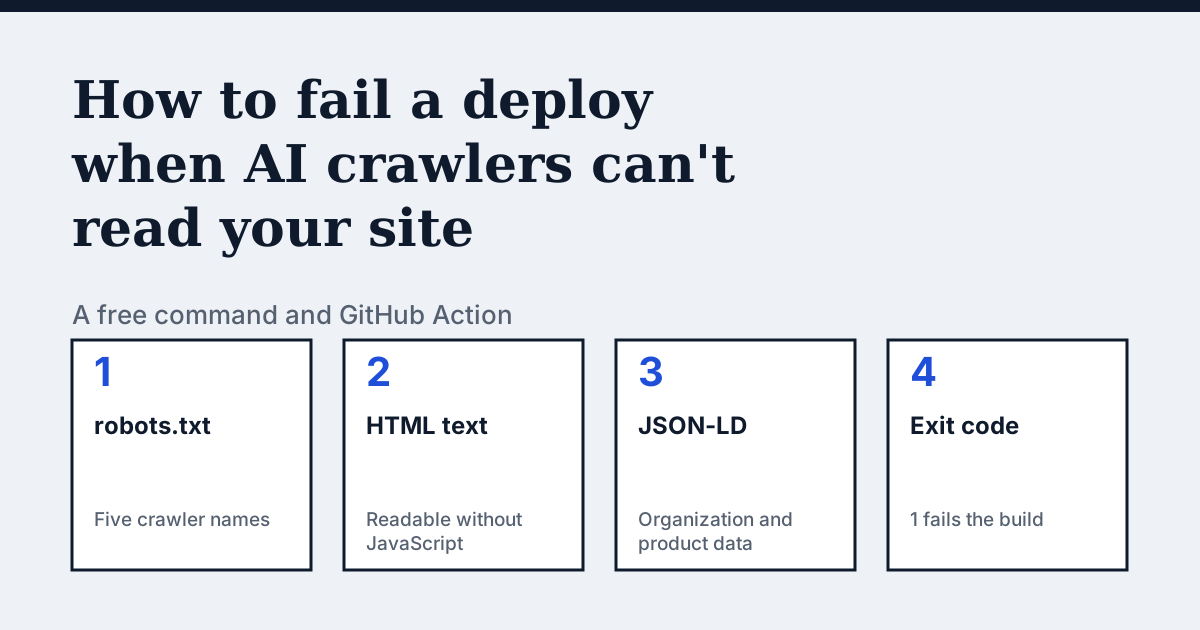
What can shut AI crawlers out after a deploy?
Three changes can do it, and a look at the finished site shows none of them.
- A
robots.txtwritten for staging ships to production with a blanketDisallow: /. UnderUser-agent: *it applies to every crawler that has no group of its own (RFC 9309). - A rewrite moves the page text into JavaScript. A visitor sees the full page, and a crawler that does not run JavaScript receives an almost empty shell. The check below reads the HTML as the server sends it, without running scripts, so it sees what such a crawler sees.
- A new CDN or firewall rule refuses the crawler. The check below cannot see this one, and the section on limits says how to test it.
OpenAI says its search systems can take about 24 hours to adjust after a robots.txt update (OpenAI). Catching a bad file at deploy time shortens that exposure.
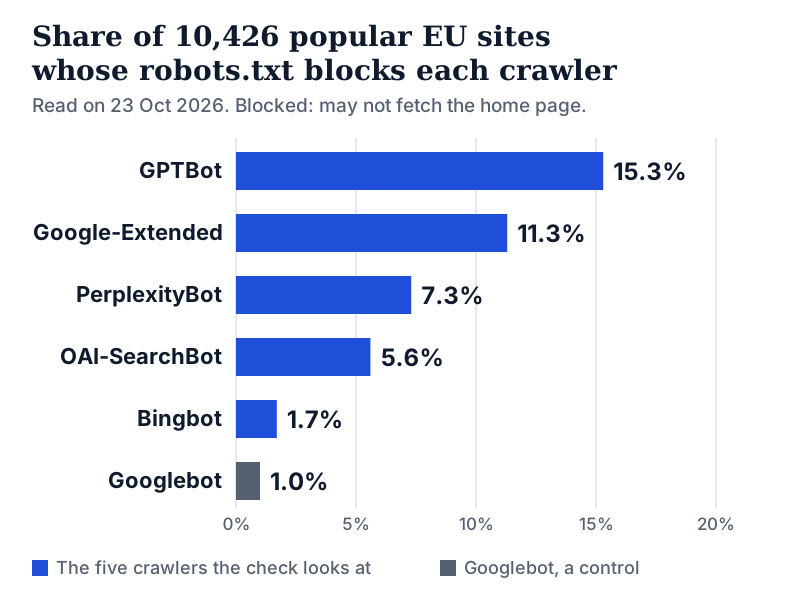
How common is a robots.txt that shuts these crawlers out? In run 1 of our EU AI-Access Index, 15.3% of 10,426 popular EU websites blocked GPTBot. Of the same sites, 7.9% blocked at least one crawler that builds an AI answer index (OAI-SearchBot, Claude-SearchBot or PerplexityBot). The index records what each file asks AI crawlers to do. We treat blocking a training crawler such as GPTBot as a legitimate choice, and a later section shows how to keep one on purpose.
What does the check look at?
citedby.eu loads robots.txt, your home page and llms.txt with a plain HTTP request, the way a crawler without a browser does. If the home page links to a product page, or the site has a Shopify product feed, it loads one product page too.
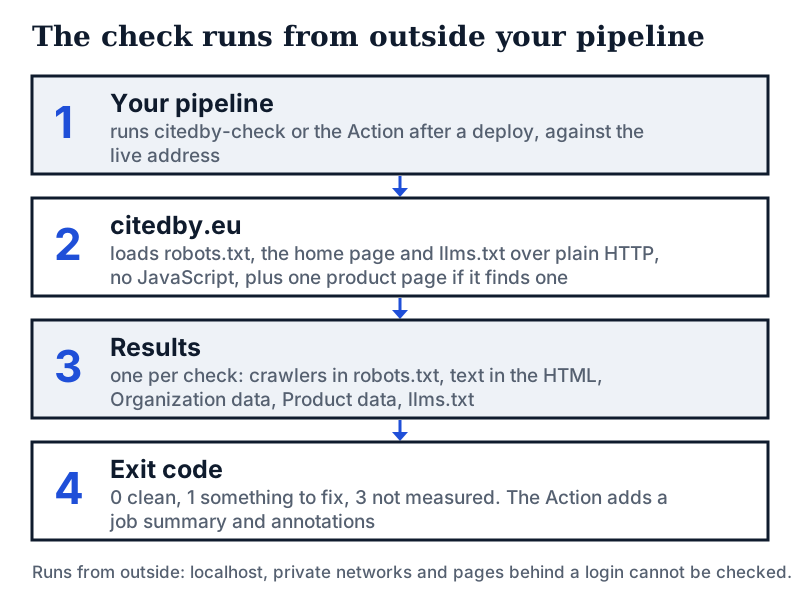
| Check | What it looks at | Result |
|---|---|---|
| Crawlers in robots.txt | Whether OAI-SearchBot, GPTBot, PerplexityBot, Google-Extended or Bingbot is shut out of the home page | OK or Fix |
| Text in the HTML | Words a crawler reads without running JavaScript: 200 or more is OK, 50 to 199 is Check, 1 to 49 is Fix. No readable text at all is Not checked | OK, Check, Fix or Not checked |
| Business data | Organization, LocalBusiness or a similar business type as JSON-LD on the home page | OK, Fix or Not checked |
| Product data | Product JSON-LD with price, availability and barcode on one product page, when the check finds one | OK, Check, Fix or Not checked |
| llms.txt | Whether the site serves a real text file at /llms.txt: more than 50 characters, not an HTML page | OK or Optional |
A missing llms.txt is reported as Optional and never fails a build. We do not expect the file to change what assistants answer (Does llms.txt work?).
Run it once from a terminal
You need Node 18 or newer and git. The package is not on the npm registry yet, so the command runs straight from GitHub:
npx github:resaleiq/citedby-check yoursite.comTo keep it installed, run npm install -g github:resaleiq/citedby-check, after which the command is citedby-check. The jq examples below assume it.
Here is a real run on example.com from 23 October 2026. --yes skips the install prompt of npx, --source none keeps the run out of the count of CLI uses, and --no-color keeps the text plain. It exits with 1 because two checks need a fix. Run the same way on citedby.eu, it printed 4 of 4 checks passed. and exited with 0.
$ npx --yes github:resaleiq/citedby-check example.com --source none --no-color
AI-search readiness check for example.com
citedby.eu loaded the site from outside: plain HTTP, no JavaScript.

  OK          AI crawlers allowed in robots.txt
              No robots.txt found, so nothing is blocked.
  FIX         Text in the page HTML
              Only 27 words are readable without JavaScript. Fix: render the
              homepage text on the server, so a crawler that does not run

              JavaScript still reads it.
  FIX         Organization data (JSON-LD)
              No Organization or LocalBusiness data. Fix: add it as JSON-LD on
              the homepage with your name, logo, address or contact and social
              profiles, so assistants get your basic facts from one place.
  NOT CHECKED Product data (JSON-LD), Price in product data, Availability in
              product data, GTIN or barcode in product data
              No product page was found from the home page, so product data was
              not checked.
  OPTIONAL    llms.txt
              No llms.txt. Optional hygiene: it is cheap to add, but we do not
              expect it to change what AI assistants answer.

1 of 3 checks passed. 2 to fix.
$ echo $?
1- A line that starts with FIX fails the build: the exit code is 1.
- NOT CHECKED is never counted as a pass. No product page was found here, so nothing was scored.
- With no robots.txt file nothing is blocked, so the crawler check is OK.
The exit codes are:
- 0: nothing at or above the level you set.
- 1: a check needs a fix.
- 2: wrong use, such as a missing address or an unknown option.
- 3: not measured: a bad address, the rate limit, a busy citedby.eu, a site that refused or did not answer, or no usable answer.
A check that did not run is never reported as a pass.
--fail-on warn also fails on Check, and --fail-on never exits 0 whenever the check ran, which gives you a report without a gate. --json prints the raw result, so you can list the failing checks in a script:
citedby-check yoursite.com --json | jq -r '.checks[] | select(.status == "fail") | .id'Add it to GitHub Actions
- Create
.github/workflows/ai-readiness.ymlwith the workflow below. - Set
urlto the public address of the live site, and choose when it runs: weekly, after each deploy, or both. - Open the run page after the first run and read the job summary and the annotations.
name: AI-search readiness
on:
  schedule:
    - cron: '0 6 * * 1'
  workflow_dispatch:
jobs:
  check:
    runs-on: ubuntu-latest
    steps:
      - uses: resaleiq/citedby-check@v0
        with:
          url: https://example.com
The step fails when a check comes back as Fix. It writes the result to the job summary and marks each problem as an annotation. It also sets the outputs result (pass, check, fix or not-measured), passed, total, fix-count and check-count. The README suggests running it after a deploy or on a schedule. For a deploy trigger, see the workflow on our CI page: it uses deployment_status, which runs after Vercel, Netlify or Render reports a deploy.
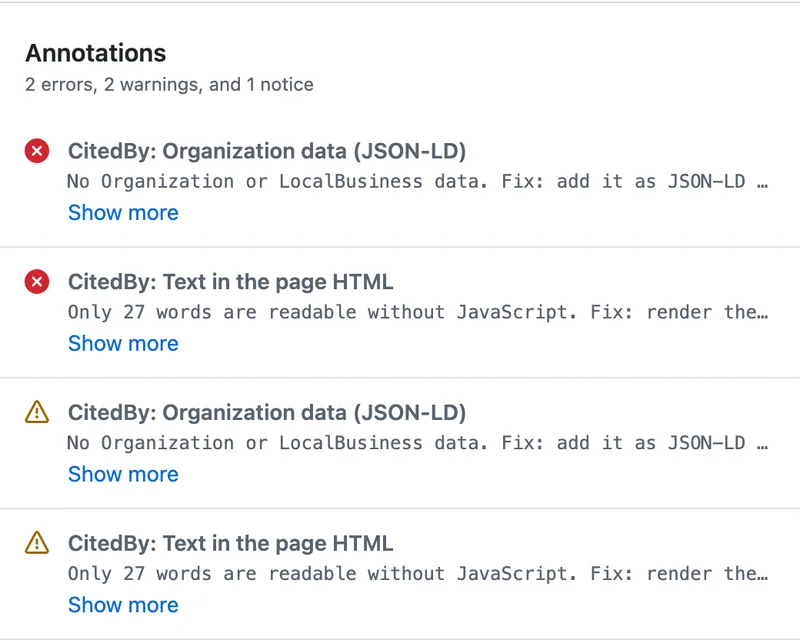
Run it against the live address after the deploy. citedby.eu checks from outside, so localhost, private network addresses and pages behind a login cannot be checked. The free check limits how often one site, and one connection, can be checked each hour. A run that hits the limit is reported as not measured with a warning, and it fails your build only when fail-on-error is true.
What a pass does not tell you
- It covers the home page and at most one product page.
- A pass means a crawler can read the pages the check loads. It does not say that an AI assistant will mention or cite your site.
- It reads robots.txt rules and sends one kind of request. A CDN or firewall rule that refuses GPTBot by name is invisible to it. To test that, compare two requests as described in Is GPTBot blocked on my site?. The AI-crawler access checker sends a live request per crawler.
- A home page that sends no text at all is reported as Not checked. The check treats an empty answer as a fetch it cannot judge. A run with no failed check still exits with 0. To fail on that case too, test for the status
unknownin the JSON:
citedby-check yoursite.com --json --fail-on never | jq -e '[.checks[] | select(.status == "fail" or .status == "unknown")] | length == 0'- If you block GPTBot on purpose, the crawler check reports Fix on every run. OpenAI treats its crawlers separately, so a site can allow OAI-SearchBot and disallow GPTBot (OpenAI). The command has no setting to ignore one crawler. With
--fail-on neverthe command itself does not exit with 1, sojqdecides. This filter fails only on checks other than a GPTBot-only block:
citedby-check yoursite.com --json --fail-on never | jq -e '[.checks[] | select(.status == "fail") | select(.id != "crawlers" or ((.blocked - ["GPTBot"]) | length > 0))] | length == 0'What is sent to citedby.eu?
The address, the language code and a tag (cli, or action in the Action) go to citedby.eu. The request also names the tool and its version in the User-Agent header, and your IP address reaches citedby.eu as with any request. citedby.eu loads your site from its own servers. It adds one to a daily counter for the tag and one to its total count of checks. The command has no telemetry, no cookies and no account, and writes no files. A run tagged none is not counted under cli or action. The check still runs and still counts in the total. The README has the details.
Prefer no dependency?
The shell script on that CI page requests your site with each crawler's own user-agent string. It runs on your machine or in your CI, calls no AI model and sends nothing to CitedBy. It does not read JSON-LD or llms.txt.
Sources
- citedby-check on GitHub: README and source, version 0.1.0
- CitedBy AI-Access Index, run 1 (robots.txt read on 23 October 2026)
- OpenAI: crawlers and user agents
- IETF RFC 9309: Robots Exclusion Protocol
See what AI answers about your shop
The audit crawls your site up to your plan's page limit, shows which AI crawlers it lets in and gives the exact fix for each issue. From €9, 14-day money-back guarantee.
Audit my siteAudit from €9, paid once. 14-day money-back guarantee.