
Guides / Guide
How to check whether ChatGPT can see and cite your website
Explanation written with AI from the official source cited on this page.
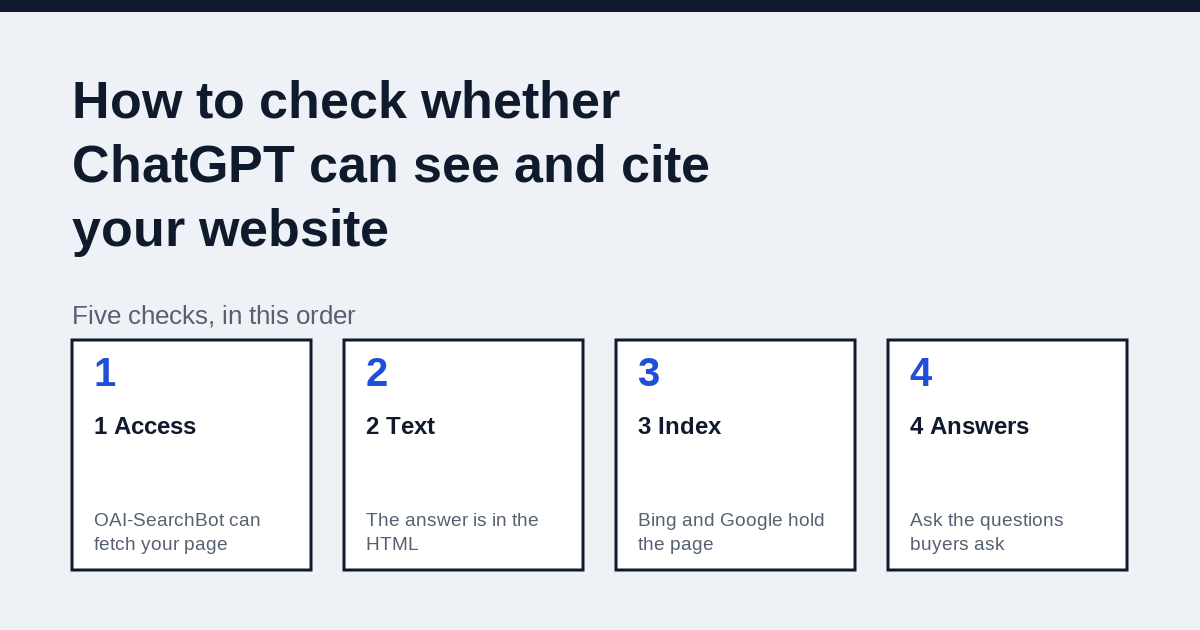
The five checks, in order
- Can the crawler fetch your pages? Type your domain into the free AI crawler checker. It reads your live robots.txt for 8 crawlers and then requests your home page once as each of the 7 that send a user agent. You see two answers per crawler: what robots.txt says, and what your server really answered.
- Is the answer in the HTML? Open the page, choose "View page source" and search for the sentence that answers the question a buyer would ask. If it is not there, the page adds its text with JavaScript, and a crawler that does not run scripts receives an empty shell. The checker also reports the number of words it could read in the raw HTML of your home page.
- Does a search index hold the page? Search your own page title in Bing and in Google, and open Bing Webmaster Tools and Google Search Console to see whether the page is indexed. Which index ChatGPT draws on is not visible from outside; Bing is the one most often named, so check both. A page that no index holds is hard for a search-backed answer to find.
- Does ChatGPT name you? In a new chat, logged out, ask the questions your buyers ask («where can I buy [what you sell] in [country]?»). Write down whether it names you, links you and gets your facts right. One answer is a sample, not a rate: ask each question five times, on different days, and count. Our 20-prompt list gives you a start.
- Do visits arrive? In your analytics or server logs, filter for the referrer
chatgpt.comor the parameterutm_source=chatgpt.com. A visit from an assistant that sends no referrer is counted as direct, so count over weeks, not days.
What each bot name means
OpenAI says its crawlers are controlled separately, so you can allow one and block another (OpenAI crawler documentation). Your result lists these names:
| Bot name | Run by | What it does | If you block it |
|---|---|---|---|
| OAI-SearchBot | OpenAI | Builds the index behind ChatGPT search | Your pages may not appear in ChatGPT search answers |
| ChatGPT-User | OpenAI | Fetches a page when a person asks ChatGPT about it | ChatGPT may not be able to open your page for that person |
| GPTBot | OpenAI | Collects content for training OpenAI's models | Opts your pages out of training; does not by itself remove you from ChatGPT search |
| Bingbot | Microsoft | Crawls for Bing, whose results feed Copilot answers | You drop out of Bing and may drop out of Copilot |
The first two decide whether ChatGPT can see you. GPTBot is a training choice. In the EU, a rightsholder can reserve their rights against text-and-data mining by machine-readable means such as a robots.txt rule (Article 4 of Directive (EU) 2019/790), so blocking a training crawler is a legitimate, documented choice.
How to read the result
| What you see | What it means | What to do |
|---|---|---|
| OAI-SearchBot shows «blocked» by robots.txt | A Disallow rule applies to it, either in its own User-agent: OAI-SearchBot group or in the User-agent: * group when the file has no group for it | Remove or narrow the rule. OpenAI says a robots.txt change for search can take about 24 hours |
| robots.txt says allowed, the live request got 403, 429 or a challenge page | A firewall, CDN or bot filter refuses the crawler. The block is not in robots.txt | Allow the crawler in your firewall or CDN: Cloudflare steps |
| Everything allowed, but the home page has under 100 words in the HTML | The text is added by JavaScript | Serve the text in the HTML: server-side rendering or a pre-rendered copy |
| Only GPTBot is blocked | You opted out of training | Nothing, unless you want training use. This is not why ChatGPT search skips you |
| Everything allowed, text in the HTML, still not named | Access is not the problem. The page may not be indexed, or it does not answer the question directly | Check step 3, then give each question one page that answers it in its first lines: what you control |
«Allowed» means a crawler may fetch your pages. It does not mean ChatGPT cites them.
How often do sites fail check 1?
Less often than people expect. On 16 November 2026, of 10,209 popular sites on EU country domains whose robots.txt we could read, 5.4% stopped OAI-SearchBot from fetching their home page and 17.4% stopped GPTBot (AI access index). In our crawl of 300 sites that launched on Show HN and 70 built with Lovable, 16% of the Show HN home pages and 74% of the Lovable ones had under 100 words of text in the raw HTML (launch crawl). Those figures say nothing about whether those sites are cited; we did not measure that.
What these checks cannot show
OpenAI's Business Hub, in beta since 10 November 2026, shows a verified business how many mentions and website clicks it gets in ChatGPT over the past 28 days (OpenAI). It does not say whether OAI-SearchBot can fetch your pages or what to change. Our checks do not show how often ChatGPT names you either: the free checker tests access only, and answers change from run to run.
Questions people ask
How can I check whether ChatGPT can see my website for free?
Run the AI crawler checker: no account, no card. It tells you which crawlers your robots.txt allows and what your server answers to each one.
If robots.txt allows OAI-SearchBot, will ChatGPT cite my site?
Not necessarily. Allowed means the crawler may fetch your pages. Whether a page is cited depends on whether it is indexed and whether it answers the question; nobody controls which page an assistant names.
Does blocking GPTBot stop ChatGPT from citing me?
Not by itself. OpenAI documents GPTBot, OAI-SearchBot and ChatGPT-User as independent settings. Check each rule on its own.
How often should I run these checks?
After every change to robots.txt, your CDN or firewall rules, or your site's theme or framework, and once a month otherwise. A block can return with a deploy.